
AI for building real games,
not generating them.
AI for building real games, not generating them.
Bezi is an agentic workspace that sits on top of your engine, built for game developers who believe that the craft of building games could do with less friction.
Bezi is an agentic workspace that sits on top of your engine, built for game developers who believe that the craft of building games could do with less friction.
Visit on desktop to download
 DragonCore
DragonMovementController.cs for fire states and movement gatingDragonFireBreath.cs for input, fuel, and VFX playbackDragon.prefab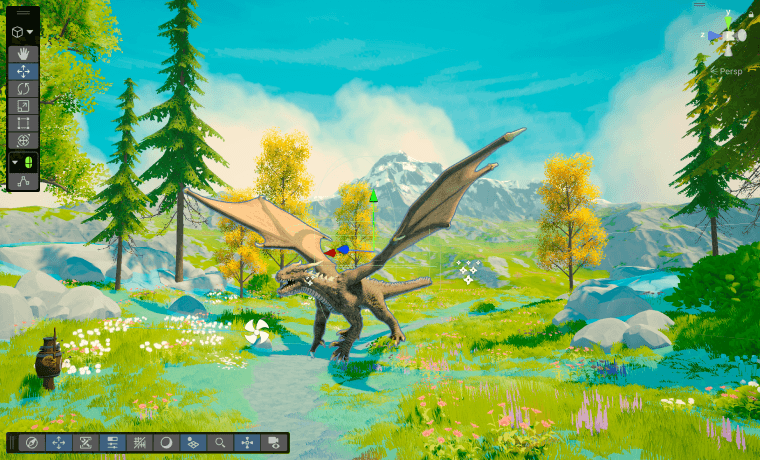





Lightfox Games
Bezi's the only day-one AI tool that all new hires get. It's sped up our feature development by 2-5x, it's unlocked our ability to have designers expand systems to iterate and find the fun, and it's been a great knowledge tool to understand project structure and what components are driving aspects of the game.

Jordan Arnold
COO, Lightfox Games
Lightfox Games
Bezi's the only day-one AI tool that all new hires get. It's sped up our feature development by 2-5x, it's unlocked our ability to have designers expand systems to iterate and find the fun, and it's been a great knowledge tool to understand project structure and what components are driving aspects of the game.
Jordan Arnold
COO, Lightfox Games
Spiral Trap Studio
Using Bezi totally revolutionized my workflow. It’s about 3x’ed my development speed and really lightened my load on the technical side of things, allowing me to focus much more on the game design and the tuning of my game to make it feel just right. I’m able to get as specific as I want, so I can create things exactly as I envision them, and not just generate slop.

Jason Lovett
Lead Developer, Spiral Trap Studio
Spiral Trap Studio
Bezi's the only day-one AI tool that all new hires get. It's sped up our feature development by 2-5x, it's unlocked our ability to have designers expand systems to iterate and find the fun, and it's been a great knowledge tool to understand project structure and what components are driving aspects of the game.
Jason Lovett
Lead Developer, Spiral Trap Studio
Duo Forge Games
Bezi was honestly a game changer for balancing. It helped us spot broken power-up interactions and edge cases way faster than we ever could manually. Having that kind of support was huge. They say “AI for building real games, not generating them” and that's exactly how it felt. We genuinely couldn't have iterated as fast without it.

Kamil & Julian
Co-Founders, Duo Forge Games
Duo Forge Games
Bezi's the only day-one AI tool that all new hires get. It's sped up our feature development by 2-5x, it's unlocked our ability to have designers expand systems to iterate and find the fun, and it's been a great knowledge tool to understand project structure and what components are driving aspects of the game.
Kamil & Julian
Co-Founders, Duo Forge Games
←
→
A pipeline-defining power tool, shaped around how you like to work.
A pipeline-defining power tool, shaped around how you like to work.
A pipeline-defining power tool, shaped around how you like to work.
Bezi enhances your depth of control over every aspect of your project, running in-engine tasks and surfacing potential bottlenecks. And the workspace shapes itself around you: your routine workflows, your toolchain, and your conventions.
Bezi enhances your depth of control over every aspect of your project, running in-engine tasks and surfacing potential bottlenecks. And the workspace shapes itself around you: your routine workflows, your toolchain, and your conventions.
Index your scenes & prefabs
Index your scenes & prefabs
Debug in Play Mode
Debug in Play Mode
Wire up Input Actions
Wire up Input Actions
Create editor tools
Create editor tools
Profile performance
Profile performance
Build particle effects
Build particle effects
Search codebase
Search codebase
Debug errors
Debug errors
Write tests
Write tests
Run builds
Run builds
Create particle systems
Create particle systems
Set up cinematic sequences
Set up cinematic sequences
Set up state machine
Set up state machine
Easily use packages
Easily use packages
Edit project settings
Edit project settings
Project comprehension
Project comprehension
Understands your full game and vision, beyond what's in-engine
Understands your full game and vision, beyond what's in-engine
Understands your full game and vision, beyond what's in-engine
Bezi factors in everything that makes your game what it is: not just code and scenes, but the design docs, spreadsheets, assets, references, local files, and git commits that live outside Unity and Unreal Engine.
Bezi factors in everything that makes your game what it is: not just code and scenes, but the design docs, spreadsheets, assets, references, local files, and git commits that live outside Unity and Unreal Engine.
Memory that compounds
Memory that compounds
Remembers how you build across sessions
Remembers how you build across sessions
Remembers how you build across sessions
Conventions, architecture decisions, and specs carry forward across threads and projects instead of resetting each time. The more you build, the better Bezi fits how you work.
Conventions, architecture decisions, and specs carry forward across threads and projects instead of resetting each time. The more you build, the better Bezi fits how you work.
 MechanicsDev
- Threshold— when the violation count bypasses 100%
- Contempt of court— instant queue
- Denys
- DELAY: target visuals on trigger, attack 1.5 seconds after
- Loading bar— indicates violation count and progress. glow and pulse when full, holding until attack is completed.
- Target circle— appears over a target region, pulsing with low opacity glow fill that targets characters in range
- Gavel— 3D asset appears and slams down over the target radius. Snap down on appear, hold, then lift back and fade out
- VFX— Light ring pulse on land, dust clouds, splinters
- Shatter effect— Visually crush floor, non-traversable for a period of time after hit
GavelSmash on your local branch is more advanced visually than on the current main, but there's a recently added Rules Tracker that you should pull down before continuing to work.Rules Tracker and find where to insert your visual work. Want me to do that?End Screen UI Check
Compare the in-game End Screen against the Figma design and flag anything that's off.
The End Screen shows the run summary — score, stars, and the level tracker — over the results backdrop. This pass checks the live UI against the source frame in Figma.
Checks
To-dos
Trust & Safety
Keeps you in control while verifying its own accuracy
Keeps you in control while verifying its own accuracy
Keeps you in control while verifying its own accuracy
Every change is reviewable before it runs. Bezi also checks its own work visually and with a proprietary verification system, so speed never costs you accuracy.
Every change is reviewable before it runs. Bezi also checks its own work visually and with a proprietary verification system, so speed never costs you accuracy.
Loved by game devs
& studios
Loved by game devs
& studios
Loved by game devs
& studios
24 VOICES / 01 FEED
24 VOICES / 01 FEED
FIELD NOTE
Bezi is my most commonly used tool and a big unlock for indie teams. It’s saved us weeks of debugging work so now we can actually focus on building our game. I can’t imagine building without it now.

Michael Leone
Systems Heavy
FIELD NOTE
The development time Bezi gives back is a huge accelerant to the creative process. The hours spent debugging and figuring out how to build game mechanics can now be spent on design and visuals to make a game really stand out.

Alex Ahlund
Game studio founder
FIELD NOTE
Bezi is truly, truly incredible. It has truly saved me a bunch of time and has helped me through the creation of some systems that I could have built myself, just not this fast.

Leonardo de Andrade
Lazy Lion Games
FIELD NOTE
Bezi is now the replacement for ChatGPT for game dev. I now exclusively use Bezi for questions about my projects, questions about different options for how to implement a feature, or debugging difficult bugs.

Nick Swift
SCH Games
FIELD NOTE
So impressed with Bezi. I gave it a pretty complex issue to analyze (a multiplayer card game where cards are getting out-of-sync between players) and it methodically and thoroughly analyzed my project hierarchy and code to give some potential causes and solutions.

Greg Bradburn
Midnite Oil
FIELD NOTE
If you're working with Unity, and you want to try out some next level AI assistants to get you moving, I definitely recommend Bezi. It’s not offering generic solutions to generic problems, it’s understanding your current implementation and augmenting it, or improving it.

Graham Weldon
Game Developer
FIELD NOTE
Bezi is a dream come true. It's an invaluable part of my game dev toolbox - you can consider me a subscriber from now on.

Klas Holmlund
Creative Director
FIELD NOTE
Shout-out to Bezi for speeding up my early iteration and framing C# development (player controllers, game manager, etc).

Mondae A.
Leap of Faith Studios
FIELD NOTE
Bezi has completely transformed my game development process - it genuinely feels like the future of game development. Its debugging capabilities are phenomenal, turning coding errors from roadblocks into solvable puzzles. It’s no exaggeration to say this will be a permanent fixture in my development pipeline.

Oneil Howell
Bad Robot Games
FIELD NOTE
There was actually a bug in my game that I couldn't figure out for weeks on end, so I asked Bezi about it and it was able to solve my issue in about 5 minutes lol

Nick De Paul
Wolf Soft Studios
FIELD NOTE
Bezi is now walking me through my game in Unity. I was trying to do the same thing with ChatGPT and Claude, but Bezi got me to my end goal 10x faster.

Nick Romanek
AirPro Diagnostics
FIELD NOTE
There have been significant leaps with AI assistance for game development: the 1st was the introduction of AI itself, the 2nd giving AI ability to think/reason before responding, and now Bezi. When I was using ChatGPT I had to keep refeeding it my code piecemeal and had to properly explain each part or what other assets or codes it may have to reference, but with Bezi it can consume the whole meal.

Danesvar Neelamagam
RoundBox Games
FIELD NOTE
Bezi is truly a game changer for designers like me who want to develop independently in Unity without needing extensive coding knowledge or relying on others. It works like an AI assistant for your Unity projects, helping streamline development, referencing elements directly from your hierarchy, and providing script suggestions that are easy to implement, all while offering guidance and helpful tips.

Anita Ghaffarian
XR Designer
FIELD NOTE
YOOOOOO, just passing by to say the new Agent mode is so good it almost made me cry! Been creating tools for Unity games for so long (10+ years) and under 30 minutes got a very complex tool to manage my game events so much more complete and useful than I would have done myself! Keep the good work folks, love this tool so much!

Vinícius Pereira
Epic Games
FIELD NOTE
Over the past couple of months I've been trying out Bezi, and it's a very useful tool. The team has made so many usability improvements since I've been using it that it's actually insane.

AIA
Game Dev Youtuber
FIELD NOTE
I’m genuinely impressed. Bezi integrates seamlessly into the Unity Editor and acts like a context-aware co-pilot, helping you debug issues, optimize performance, and accelerate development with real-time, AI-guided insights. From spotting null references to suggesting smart scene optimizations, it's like pair programming with a tireless, laser-focused dev buddy.

Yousuf Jawad
Raven Games
FIELD NOTE
Bezi enables me to create more powerful Unity tooling faster than I've been able to do manually, and in some cases, the systems enabled systems that I didn't even know existed. The ability to recognize project specific settings, errors, and multiple classes at once makes Bezi smarter, and easier to work with for usable results.

Andrew Slater
Unity Technologies
FIELD NOTE
Finally had the time to test Bezi fully and it’s a game changer. Massive increase in workflow productivity!

Reegan Naidoo
Gamebok
FIELD NOTE
Y'all are geniuses. Agent mode is the best. The AI giving clear instructions, being able to "@" references, giving code with tool tips and useful public inspector tweakable fields. Perfection.

Brandon Whitman
Game Developer
FIELD NOTE
I recently got Bezi, and I found this tool extremely helpful. Bezi helps me integrate a quantity of disciplines that could hardly be possible without AI, and it’s helping me create a pretty unique narrative procedural engine, even creating modules! I now produce 6x faster modules with this app. This tool is literally changing the way I develop in Unity.

Elrik Miralda
Game Developer
FIELD NOTE
Bezi has accomplished more in a week than I could achieve with other AI tools in a month. Finding Bezi was a game changer.

Mark Pratt
Indie Game Developer
FIELD NOTE
Bezi is a big win for small teams. It makes designing complex mechanics such as 2D RTS pathfinding and a fog of war system a breeze. Outperforms other coding assistants in understanding of both Unity and the needs and structure of my projects.

Cillian Clifford
Game Developer
FIELD NOTE
After just 10 days of using Bezi, I have accomplished more than I did in months. With speed, accuracy, and access to complete code structures in minutes, the only bottleneck now is art. I am amazed how quickly I’ve been knocking out systems and can focus on the things I enjoy!

Stephen Clarke
Tesla
FIELD NOTE
Bezi is an incredible tool. It helps me tackle complex coding work quickly, freeing up time for other priorities. The time savings alone make it indispensable. 10/10 — I would absolutely recommend it to anyone.

Jonathan Sawyer
Foxnova Studios
FIELD NOTE
Bezi is my most commonly used tool and a big unlock for indie teams. It’s saved us weeks of debugging work so now we can actually focus on building our game. I can’t imagine building without it now.
Michael Leone
Systems Heavy
FIELD NOTE
The development time Bezi gives back is a huge accelerant to the creative process. The hours spent debugging and figuring out how to build game mechanics can now be spent on design and visuals to make a game really stand out.
Alex Ahlund
Game studio founder
FIELD NOTE
Bezi is truly, truly incredible. It has truly saved me a bunch of time and has helped me through the creation of some systems that I could have built myself, just not this fast.
Leonardo de Andrade
Lazy Lion Games
FIELD NOTE
Bezi is now the replacement for ChatGPT for game dev. I now exclusively use Bezi for questions about my projects, questions about different options for how to implement a feature, or debugging difficult bugs.
Nick Swift
SCH Games
FIELD NOTE
So impressed with Bezi. I gave it a pretty complex issue to analyze (a multiplayer card game where cards are getting out-of-sync between players) and it methodically and thoroughly analyzed my project hierarchy and code to give some potential causes and solutions.
Greg Bradburn
Midnite Oil
FIELD NOTE
If you're working with Unity, and you want to try out some next level AI assistants to get you moving, I definitely recommend Bezi. It’s not offering generic solutions to generic problems, it’s understanding your current implementation and augmenting it, or improving it.
Graham Weldon
Game Developer
FIELD NOTE
Bezi is a dream come true. It's an invaluable part of my game dev toolbox - you can consider me a subscriber from now on.
Klas Holmlund
Creative Director
FIELD NOTE
Shout-out to Bezi for speeding up my early iteration and framing C# development (player controllers, game manager, etc).
Mondae A.
Leap of Faith Studios
FIELD NOTE
Bezi has completely transformed my game development process - it genuinely feels like the future of game development. Its debugging capabilities are phenomenal, turning coding errors from roadblocks into solvable puzzles. It’s no exaggeration to say this will be a permanent fixture in my development pipeline.
Oneil Howell
Bad Robot Games
FIELD NOTE
There was actually a bug in my game that I couldn't figure out for weeks on end, so I asked Bezi about it and it was able to solve my issue in about 5 minutes lol
Nick De Paul
Wolf Soft Studios
FIELD NOTE
Bezi is now walking me through my game in Unity. I was trying to do the same thing with ChatGPT and Claude, but Bezi got me to my end goal 10x faster.
Nick Romanek
AirPro Diagnostics
FIELD NOTE
There have been significant leaps with AI assistance for game development: the 1st was the introduction of AI itself, the 2nd giving AI ability to think/reason before responding, and now Bezi. When I was using ChatGPT I had to keep refeeding it my code piecemeal and had to properly explain each part or what other assets or codes it may have to reference, but with Bezi it can consume the whole meal.
Danesvar Neelamagam
RoundBox Games
FIELD NOTE
Bezi is truly a game changer for designers like me who want to develop independently in Unity without needing extensive coding knowledge or relying on others. It works like an AI assistant for your Unity projects, helping streamline development, referencing elements directly from your hierarchy, and providing script suggestions that are easy to implement, all while offering guidance and helpful tips.
Anita Ghaffarian
XR Designer
FIELD NOTE
YOOOOOO, just passing by to say the new Agent mode is so good it almost made me cry! Been creating tools for Unity games for so long (10+ years) and under 30 minutes got a very complex tool to manage my game events so much more complete and useful than I would have done myself! Keep the good work folks, love this tool so much!
Vinícius Pereira
Epic Games
FIELD NOTE
Over the past couple of months I've been trying out Bezi, and it's a very useful tool. The team has made so many usability improvements since I've been using it that it's actually insane.
AIA
Game Dev Youtuber
FIELD NOTE
I’m genuinely impressed. Bezi integrates seamlessly into the Unity Editor and acts like a context-aware co-pilot, helping you debug issues, optimize performance, and accelerate development with real-time, AI-guided insights. From spotting null references to suggesting smart scene optimizations, it's like pair programming with a tireless, laser-focused dev buddy.
Yousuf Jawad
Raven Games
FIELD NOTE
Bezi enables me to create more powerful Unity tooling faster than I've been able to do manually, and in some cases, the systems enabled systems that I didn't even know existed. The ability to recognize project specific settings, errors, and multiple classes at once makes Bezi smarter, and easier to work with for usable results.
Andrew Slater
Unity Technologies
FIELD NOTE
Finally had the time to test Bezi fully and it’s a game changer. Massive increase in workflow productivity!
Reegan Naidoo
Gamebok
FIELD NOTE
Y'all are geniuses. Agent mode is the best. The AI giving clear instructions, being able to "@" references, giving code with tool tips and useful public inspector tweakable fields. Perfection.
Brandon Whitman
Game Developer
FIELD NOTE
I recently got Bezi, and I found this tool extremely helpful. Bezi helps me integrate a quantity of disciplines that could hardly be possible without AI, and it’s helping me create a pretty unique narrative procedural engine, even creating modules! I now produce 6x faster modules with this app. This tool is literally changing the way I develop in Unity.
Elrik Miralda
Game Developer
FIELD NOTE
Bezi has accomplished more in a week than I could achieve with other AI tools in a month. Finding Bezi was a game changer.
Mark Pratt
Indie Game Developer
FIELD NOTE
Bezi is a big win for small teams. It makes designing complex mechanics such as 2D RTS pathfinding and a fog of war system a breeze. Outperforms other coding assistants in understanding of both Unity and the needs and structure of my projects.
Cillian Clifford
Game Developer
FIELD NOTE
After just 10 days of using Bezi, I have accomplished more than I did in months. With speed, accuracy, and access to complete code structures in minutes, the only bottleneck now is art. I am amazed how quickly I’ve been knocking out systems and can focus on the things I enjoy!
Stephen Clarke
Tesla
FIELD NOTE
Bezi is an incredible tool. It helps me tackle complex coding work quickly, freeing up time for other priorities. The time savings alone make it indispensable. 10/10 — I would absolutely recommend it to anyone.
Jonathan Sawyer
Foxnova Studios
CONTINUOUS FEED / DRAG TO SCROLL
CONTINUOUS FEED / swipe TO SCROLL

Player-Driven Chaos as the New North Star of Social Party Games — Interview with the Creator of Plush Time
Player-Driven Chaos as the New North Star of Social Party Games — Interview with the Creator of Plush Time
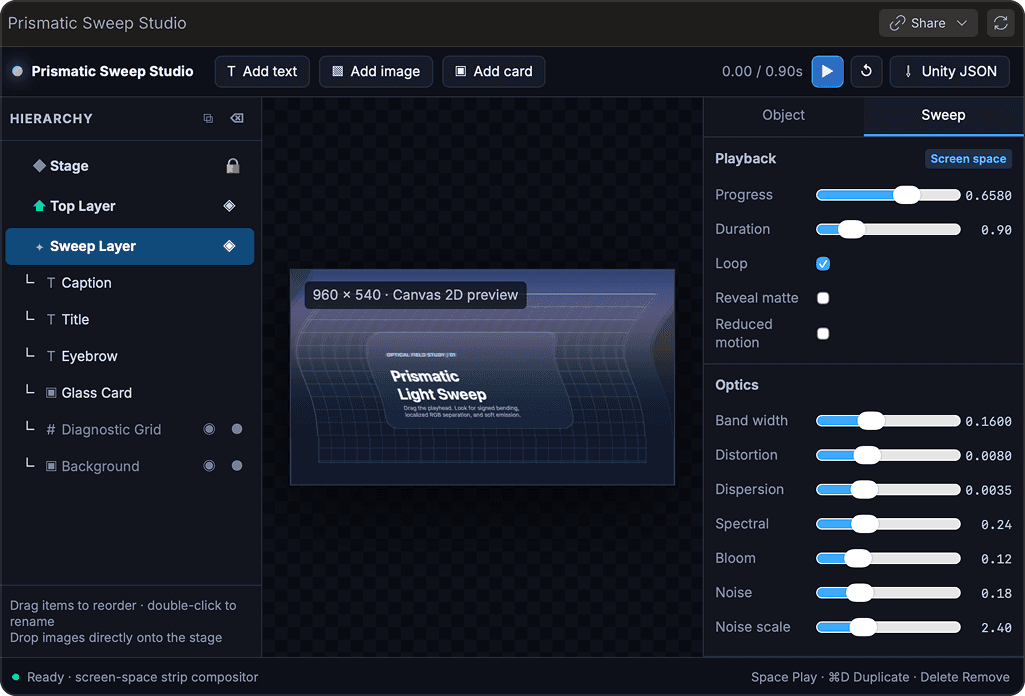
Introducing Proofs — visual, dynamic interfaces in Bezi
Introducing Proofs — visual, dynamic interfaces in Bezi

How Duo Forge Built and Balanced 70+ Interacting Power-Ups in Coinsweeper
How Duo Forge Built and Balanced 70+ Interacting Power-Ups in Coinsweeper
Why Our Biggest Game Jam Gives Away GDC Passes
Why Our Biggest Game Jam Gives Away GDC Passes